Siemens Climatix often appears where the system integrator does not start with a conventional building controller, but with the HVAC machine itself. An air-handling unit, chiller, heat pump, heat-recovery unit or district-heating substation may arrive on site as a functioning OEM system with its own Climatix controller. To the supervisory BMS it may look like one device; to the service engineer it contains an entire world of objects, parameters, schedules, trends and process logic.
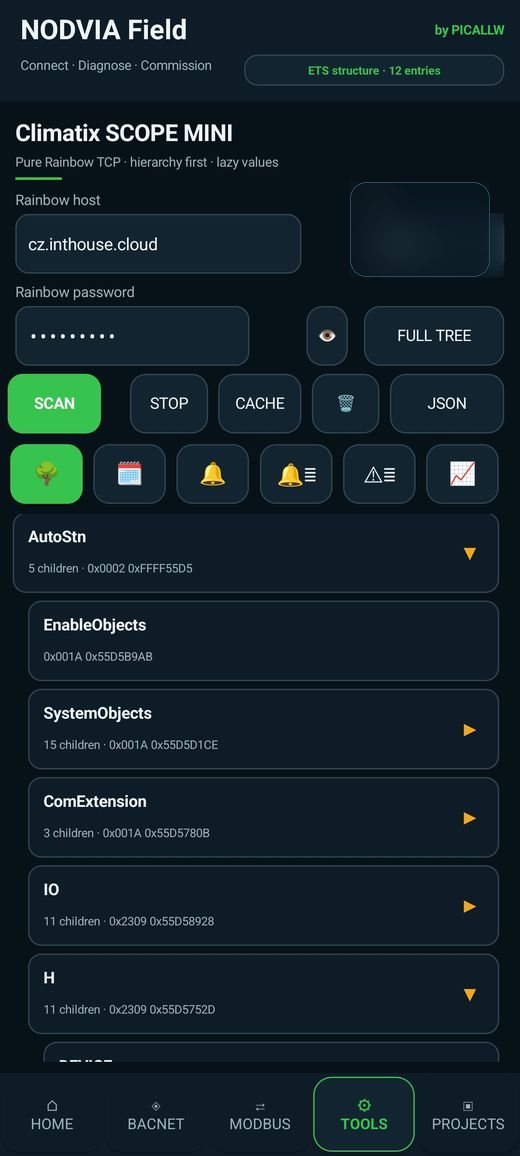
This creates a practical field question: how can an engineer look into Climatix quickly without opening a full engineering workstation for every first inspection? That question led to Climatix SCOPE MINI inside NODVIA Field.
What is Siemens Climatix?
Siemens Climatix is a controller and automation family aimed at HVAC OEM applications. Siemens positions it for equipment manufacturers that need control inside machines and functional packages, not only room or building-level automation. Official Siemens HVAC material includes applications such as chillers and heat pumps, district heating, heat recovery, boilers and other HVAC equipment.
That distinction matters. A traditional BMS often thinks in terms of the whole building; Climatix is frequently embedded inside a piece of mechanical equipment. The controller may have to coordinate start sequences, safety conditions, fans, compressors, valves, temperature and pressure signals and external communication.
What is the official Siemens SCOPE?
Siemens documentation for Climatix C400 describes SCOPE as a commissioning and service tool for Climatix controllers and HMIs. It is much more than a simple browser. Officially listed functions include application/BSP download, reading and editing data-point objects and members, parameter upload/download, online trend logging, archive configuration and work with HMI/language resources.
In other words, SCOPE is a full manufacturer engineering environment. If the task involves application programming, downloads, complete commissioning or project-level changes, the official Siemens SCOPE is the right tool.
Why a mobile SCOPE MINI?
Field diagnostics has a different rhythm from application development. The technician may be standing next to an AHU with a phone in hand while the laptop is still in the service bag. The immediate questions are often simple but time-critical:
- can I reach the controller;
- where is the relevant object in the hierarchy;
- what is the current value;
- does the parameter look correct;
- what does the schedule say;
- what happened in the trend history;
- is the fault inside the machine or in the integration toward the BMS?
Getting these answers next to the equipment can shorten the diagnostic path considerably. That is the niche SCOPE MINI is designed for.
Tree first, values lazy
One of the important design decisions in SCOPE MINI concerns how data is read. A large Climatix application may contain many objects. Reading every value and member before showing anything would make the first mobile view unnecessarily slow.
The approach is therefore tree first, values lazy: load the hierarchy quickly, let the engineer navigate to the relevant branch, and read detailed values only when a specific object or member is opened. The same idea works well in mobile BACnet and KNX browsing—find the correct place first, then load the detail.
This reduces traffic and, more importantly, reduces time to the first useful screen.
An object is more than a row in the tree
Selecting an object opens a more detailed service view. The intention is similar to BACnet or Modbus object detail: clear identity, current values, relevant members and—where supported and safe—writing or trend access.
The user interface also separates expanding a branch from opening the object itself. The arrow navigates deeper into the hierarchy; selecting the item opens object detail. In a large tree, this small distinction protects context and makes field navigation much faster.
Schedules are a real service function
Many HVAC complaints are not caused by failed hardware but by schedules. Equipment does not start because it is outside an active interval; a parameter changes at the wrong time; the operator expects a weekend mode that is not actually configured. A mobile schedule view is therefore far more than cosmetic.
Time writing also has to be handled correctly. A service application must interpret the Climatix time representation accurately rather than displaying or writing unintended milliseconds or internal values. For commissioning tools, correctness matters more than the number of buttons on screen.
Trend history: what happened before the technician arrived?
A live value describes only the present. Service work often asks what happened earlier. Trend history is therefore one of the most useful SCOPE MINI capabilities.
During development, archive index objects, actual trend archive objects and archived process points had to be distinguished correctly. Once the archive structure is interpreted correctly, the mobile tool can present a meaningful history catalogue and open the correct archive as a graph. Mapping archive points back to real tree names and hierarchy paths is much more useful than showing anonymous object IDs.
For example, supply-air temperature may look normal at noon while the operator reports a problem at 06:00. Historical data can show whether the temperature was high, a fan was stopped or the problem was elsewhere in the sequence.
Alarms and events: accuracy before marketing
Climatix alarms are not simply another register list. Development work has shown that active alarms, alarm history and event history need to be distinguished and that the listener/registration behaviour used by the original SCOPE matters. For that reason, the public NODVIA Field presentation does not claim full alarm equivalence with the official SCOPE merely because an alarm button exists.
The alarm workflow continues to evolve. It is more professional to strongly market functions that are already directly useful—tree navigation, object detail, schedules and trend history—and expose additional alarm/event functions as they become sufficiently verified across controllers and application variants.
Project cache: Project A must not become Project B
A service engineer may visit several sites in one day. Reusing a Climatix tree from the wrong project would create serious confusion. NODVIA Field therefore separates SCOPE cache by project.
The cached data includes tree structure and object/member metadata rather than treating old live process values as current truth. When the active project changes, the runtime context is cleared and the selected project's cache is loaded. A new project starts with an empty SCOPE context.
This is not a flashy feature, but it is the kind of detail that makes a field tool professional rather than merely impressive in a demo.
SCOPE MINI inside the wider NODVIA Field workflow
Climatix is only one layer of a real site. The problem may begin with IP networking, continue inside the Climatix controller and end at a BACnet or Modbus interface toward the supervisory system. SCOPE MINI is therefore most valuable as part of a wider toolkit.
NODVIA Field also includes network discovery, BACnet, Modbus TCP/RTU, KNX, Siemens EM1 Tool, M-Bus, USB Serial and engineering utilities. The engineer can follow a single Connect → Diagnose → Commission workflow instead of switching between unrelated mobile tools.
A practical field sequence
- use Network Discovery to verify IP connectivity;
- open Climatix SCOPE MINI and load/cache the project structure;
- find the relevant function or I/O in the tree;
- open object detail and inspect the current value and supported members;
- if the issue is time-dependent, inspect schedules and trend history;
- if the problem lies in integration, continue with BACnet or Modbus diagnostics;
- retain project context for the next visit and create a report if required.
The aim is not to replace engineering knowledge but to remove unnecessary steps between a field question and the data needed to answer it.
When do you still need the full Siemens SCOPE?
Use the official Siemens tool when you need application/BSP downloads, project-level changes, advanced commissioning, HMI/language work or other functions outside the supported SCOPE MINI scope. A phone should not create a false impression that every engineering task belongs on a phone.
Professional use also means knowing the boundary of the tool. That boundary is what makes SCOPE MINI useful: it stays focused on fast field visibility while full engineering remains in the manufacturer environment.
Conclusion
Siemens Climatix is an important HVAC OEM platform that system integrators often encounter inside finished equipment. Official Siemens SCOPE is the full commissioning and service environment. NODVIA Field Climatix SCOPE MINI addresses a different need: fast mobile access to hierarchy, values, schedules and trend history directly next to the equipment.
The real value is not that MINI is a “smaller SCOPE”. It is that it sits inside a broader field workflow. When an engineer must first discover the device, then understand the Climatix controller and finally verify integration toward the BMS, one coherent mobile environment can be far more useful than a collection of disconnected utilities.