devices · networks · protocols
NODVIA by PICALLW
Universal Automation Platform
Connect. Integrate. Automate.
NODVIA is a building automation software family for BACnet, Modbus, KNX, M-Bus and related field systems. It connects Android field diagnostics, project data, HMI design, cloud delivery and operator visualization. Field, Studio, Cloud and View form one connected workflow, while Connect, Core, Logic and Edge extend the same model into integration and local automation.
Local-firstMulti-protocolModularField → Studio → Cloud → View
ⓘ Why the name NODVIA?
NODE + VIA
Node represents a controller, device, meter or system. Via represents the path or connection between them. NODVIA therefore describes the core idea of the platform: connecting different nodes through different communication paths into a useful whole.
NODVIA PLATFORMfrom data to automation
BACnet · Modbus · KNX · MQTT …
data · rules · schedules · control
SCADA/HMI · gateways · services
01 · FIRST PRACTICAL STEPCONNECT DIAGNOSE COMMISSION
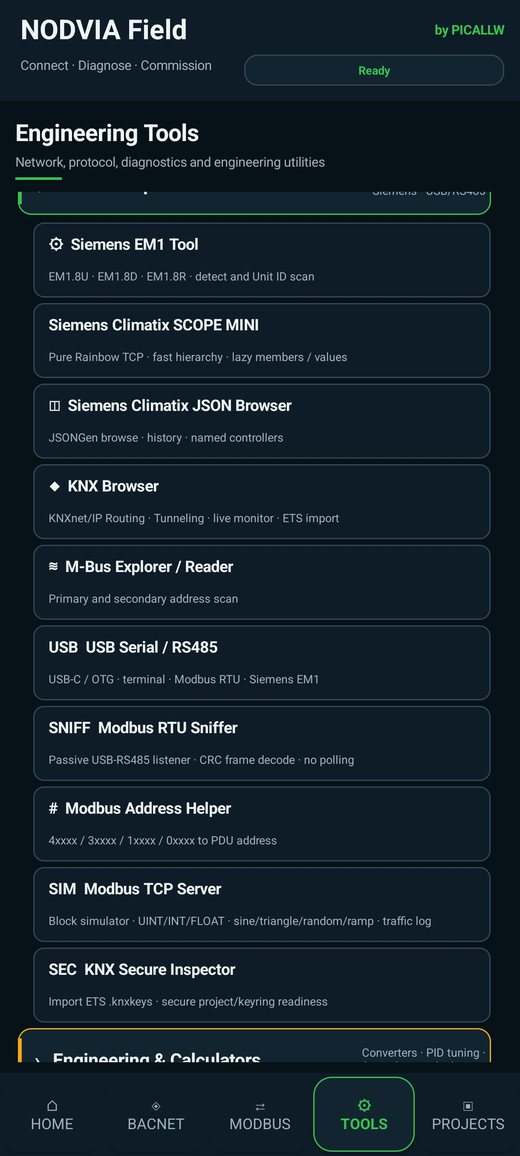
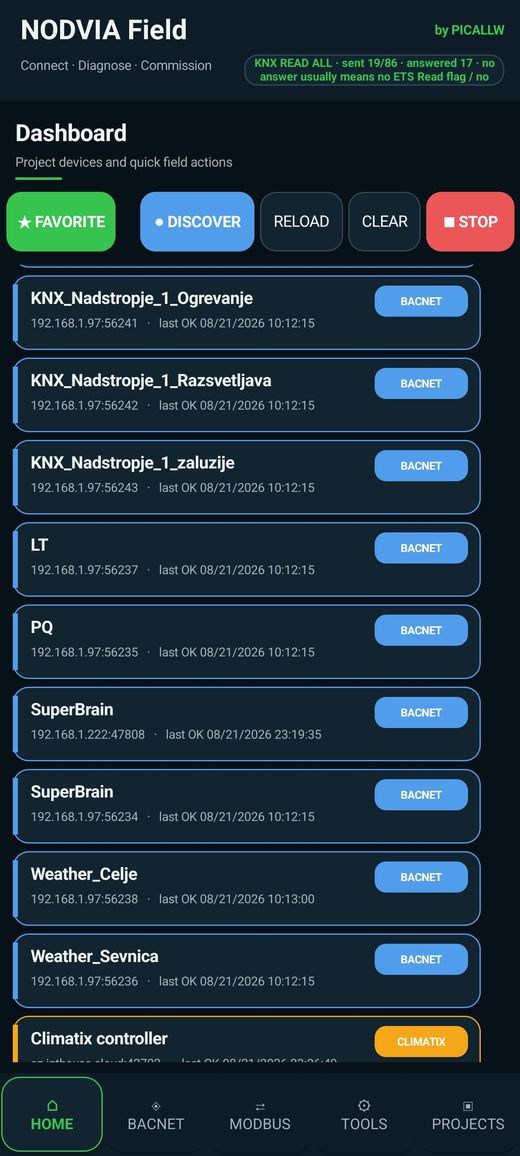
NODVIA Field
The Swiss Army knife for building automation engineers.
An Android field toolkit for system integrators, service technicians and commissioning engineers. NODVIA Field brings common diagnostics and specialized service tools onto the phone already in your pocket.
Discover networks, devices and communication paths.
Inspect objects, registers, values, topology, trends and communications.
Perform supported writes and settings, save project context and create reports.
PRACTICAL HMI WORKFLOW
Field → Studio → Cloud → View
NODVIA Field, Studio, PICALLW Cloud and NODVIA View create one connected project workflow from field engineering to the operational Android HMI.
NODVIA Field
Discover. Diagnose. Commission. Collect real devices, points and service context.
Field →NODVIA Studio
Design the HMI from the project tree and manage Project ID, publishing, deployment and Cloud projects.
Studio →PICALLW Cloud
HTTPS project delivery, versions, SHA-256, QR deployment and license/seat context.
NODVIA View
Standalone fullscreen Android HMI for tablets and touch panels — without Field service menus.
View →NODVIA FAMILY
One concept, clearly separated roles.
NODVIA is not one monolithic application. The platform is divided into modules that can be adopted progressively according to the needs of the site.
NODVIA Field
Mobile diagnostics, commissioning and service. The first contact with devices and communications.
Explore Field →NODVIA Studio
Windows HMI designer and Cloud project manager: design, publish, Project ID, deployment, license/seats and Browse/Open Cloud Projects.
Explore Studio →NODVIA View
Standalone Android HMI visualization runtime for fullscreen tablets, wall-mounted touch panels and operator screens, deployed from Studio through PICALLW Cloud.
Explore View →NODVIA Core
Runtime, data model, configuration and shared platform services.
NODVIA Connect
Connectivity layer for BACnet, Modbus, MQTT and other protocols.
NODVIA Logic
Logic engine for conditions, timing, calculations and process rules.
NODVIA Edge
Gateway and edge layer for local integration and supervisory connectivity.
NODVIA Mobile
Mobile operational interface for fast use on phones and tablets.
IMPLEMENTATION STATUS
Where is NODVIA today?
The practical HMI workflow is now clearly separated between Field, Studio/Cloud and the standalone View runtime. The broader Connect, Core, Logic and Edge layers continue the platform toward persistent integration and automation.
NODVIA Field
The active first step. Android commissioning and service toolkit for discovery, diagnostics, project workflow and reporting.
Field →NODVIA Studio + Cloud
Built and under active testing. HMI design, Project ID, HTTPS publish, deployment, View licensing/seats and Cloud project browser.
Studio →NODVIA View
The new standalone member. Fullscreen Android HMI runtime for projects published from Studio through PICALLW Cloud.
View →Connect · Core · Logic · Edge
Broader platform layers in active development/testing. Protocol integration, runtime, logic and edge/gateway roles.
Practical deployment: Field → Studio → PICALLW Cloud → View. Wider automation: Connect → Core/Logic → Edge.
WHY NODVIA
Real buildings are not one protocol and one vendor.
A single site can contain BACnet, Modbus, KNX, M-Bus, Siemens Climatix, web devices and legacy equipment. Room automation may also combine KNX with DALI/DALI-2 lighting through gateways, including dimming, scenes, occupancy/daylight logic and coordinated blinds or shading. NODVIA is built around that reality: first understand communication and data, then connect them into a stable automation system.
BACnetModbusKNXKNX/DALI gatewaysMQTTM-BusClimatixS7OPC UA
KNOWLEDGE
The engineering behind NODVIA.
Technical articles connect NODVIA Field, Studio, protocols and real devices with practical commissioning and HMI workflows.
BACNET · FIELD GUIDE
BACnet Troubleshooting: 43 field problems and solutions
A practical guide from BACnet/IP and BBMD through MS/TP, APDU, COV, Wireshark and BACnet Secure Connect.
Read the field guide →SIEMENS · MODBUS I/OSiemens EM1: cost-effective I/O expansion and faster commissioning
What EM1.8D, EM1.8R and EM1.8U are, how their Modbus communication works, and how the NODVIA Field EM1 Tool simplifies discovery, diagnostics and configuration.
Read the technical article →SIEMENS · HVACSiemens Climatix and SCOPE MINI on Android
An introduction to the Climatix platform and the official Siemens SCOPE tool, followed by the practical role of SCOPE MINI for object trees, schedules and trend history.
Read the technical article →NODVIA · HMIField → Studio → Cloud → View: from field point to operational HMI
How project points move from Field into Studio, through Cloud deployment and into the standalone NODVIA View runtime.
Read the technical article →NODVIA · VISIONCan Software Understand a Building?
A forward-looking path from BACnet points to semantic twins, auto-generated HMI and intelligent diagnostics.
Read the flagship article →START HERE
Start in the field. Grow into the platform.
NODVIA Field is the first practical step; Studio and View form the HMI deployment workflow, while Connect, Core, Logic and Edge expand the same platform into broader integration and automation.